Product
Export Your Captions as Transcripts — Because Reading Is Still a Thing
At Sundra, we’re all about making life easier for HR and L&D teams. We get it — your time is precious, your training rollouts are on tight deadlines, and captioning is just one piece of a much bigger puzzle that includes onboarding, compliance training, internal comms, and keeping a global workforce engaged. But guess what? We’ve just made that puzzle piece even more versatile. Say hello to our latest feature: exporting captions as transcripts.
Before you think “another feature? How thrilling…” — stick with us. This is the kind of update that could quietly become one of your most-used tools. So grab a coffee, settle in, and let’s dig into why it matters, how it helps, and why you’ll wonder how you ever ran training programs without it.
The magic of TXT files: it’s more than just text
You might be wondering, “Why would I need a TXT file when I already have captions?” Fair question — and we’ve got a few good answers.
1. Get a clear overview of your training library
Imagine you’ve got hours of recorded training sessions, town halls, onboarding videos, and leadership messages. Scrubbing through all that footage to find a specific explanation or policy detail? Exhausting. With a transcript, everything is laid out in plain text — like a map of your content. You can skim through, find the exact moment you need, and get back to the work that actually moves the needle.
2. Easier searching: ⌘ + F is your new best friend
Ever spent ages hunting for that one line from last quarter’s compliance training or the CEO’s all-hands? With a TXT file, just hit ⌘ + F (or Ctrl + F on Windows) and type a keyword. Done. It’s like having a superpower for your learning library.
3. Repurpose training content across formats
Not everyone learns the same way. Some employees retain information better by reading, others by watching, and some want to skim a summary before committing to a full video. Transcripts let you offer the same content in multiple formats — video for visual learners, text for readers, and searchable reference material for anyone who needs to look something up later.
4. Turn training videos into written resources
Employee handbooks, knowledge base articles, intranet posts, internal newsletters — they all need content, and you’ve already produced it in your training videos. Exporting captions as transcripts gives you a ready-made source of material that can be repurposed into policy documents, FAQs, manager talking points, or onboarding guides. It’s recycling, but smarter.
5. Preserve knowledge for the long haul
People move on, teams restructure, and institutional knowledge has a habit of walking out the door. Transcripts are perfect for archiving: they ensure that every word of your training, onboarding, and leadership communications is preserved, searchable, and ready to revisit whenever needed. It’s also a great way to meet records-retention and compliance requirements.
6. Meet compliance and accessibility requirements
Working in HR means navigating regulations — GDPR, the European Accessibility Act, WCAG, ADA, and internal audit requirements, to name a few. Having written transcripts alongside your video content makes it significantly easier to meet accessibility standards and document that training has been delivered. No more last-minute scramble before an audit — just a few clicks and you’re covered.
7. Support every kind of learner (and every kind of reader)
Some of your employees will always prefer reading over watching — whether it’s because they process information faster that way, they’re in a quiet office, or they’re revisiting a topic they already understand. Offering transcripts alongside video gives your people another way to engage with the material, which typically translates into better knowledge retention and higher completion rates.
How to use this feature (spoiler: it’s super easy)
We know you’re busy, so we made this as user-friendly as possible:
- Upload your video, audio, or recording — just like you always do.
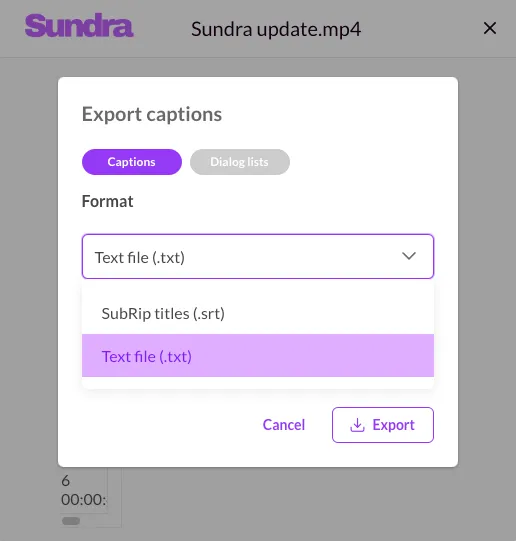
- Export as “Text file (.txt)” — you’ll find this option in the export menu.
- Download and use — share it with your team, upload it to your LMS, archive it, or send it to comms.
That’s it. No fuss, no friction — just pure transcript goodness.
Why we’re excited about this (and why you should be too)
At Sundra, we’re always looking for ways to help HR and L&D teams work smarter, not harder. This new export option is one more tool in your arsenal, designed to make training more accessible, more flexible, and more impactful.
Being responsible for learning and development is no small feat. You’re juggling global rollouts, compliance deadlines, engagement metrics, and the very real challenge of making sure every employee — regardless of language, location, or ability — feels included. We’re here to take some of that weight off your shoulders. By turning your captions into transcripts, we’re giving you more flexibility, more control, and more ways to make your training content shine.
So give it a try. We can’t wait to see how you use this feature to level up your L&D programs — and we have a feeling you’ll find uses for it we haven’t even thought of yet.
Until then — happy captioning, transcribing, and TXT-ing.
P.S. If you have any questions or need help getting started, our support team is just a click away. We’re here to help you make the most of this feature and ensure your captioning experience is nothing short of awesome.
Thanks for being part of the Sundra family — we can’t wait to see what you create next.